“ATEN Essentials 2 x 2 USB 3.2 Gen 1 Sharing Switch” has been added to your basket.
View basket
Showing 1–16 of 18 results
-

R775
The 2L-7D02UDX3 Secure KVM Cable kit offers high- quality data connections between the Secure KVM Switch and your DVI dual display servers and computers. The cable kit enables the connection of Video, USB Keyboard/Mouse/CAC, and Audio (Speaker), delivering excellent performance with ATEN PSS PP v3.0 Secure KVM Switches.
-

R285
The 6′ 2L-5202U USB KVM Cable from ATEN is designed for use with KVM switches and extenders . This cable can be used to connect a KVM switch with an SPHD-15 connection to a console using a USB connection for the keyboard and mouse and an HDB-15 connection for the monitor.
-

R400
The 10′ 2L-5203U USB KVM Cable from ATEN is designed for use with KVM switches and extenders . This cable can be used to connect a KVM switch with an SPHD-15 connection to a console using a USB connection for the keyboard and mouse and an HDB-15 connection for the monitor.
-


R10665
The CE604 DVI Dual View KVM Extender from ATEN allows you to separate the monitors, keyboard, and mouse from the physical computer by up to 200′ using one or two Ethernet cables – a single cable if one monitor is used, and two cables if two monitors are used. The system supports one or two DVI monitors, has dual USB ports on the Remote Unit for a keyboard and mouse, and has a microphone input and headphone/speaker output. In addition, there is an RS-232 interface for legacy serial devices or integrating the extender with RS-232-operated A/V hardware.
-


R530
Share up to two USB peripherals between two computers using the ATEN Essentials 2 x 2 USB 3.2 Gen 1 Sharing Switch. This sharing switch features two USB-A 3.2 Gen 1 ports for peripherals, as well as two USB-A 3.2 Gen 1 ports for connecting to your computer. The built-in push button makes it simple and easy to switch between computers. When connected to a computer, the sharing switch automatically powers on for convenience.
-


R465
Share up to four USB peripherals between two computers using the ATEN Essentials 2 x 4 USB 2.0 Sharing Switch. This sharing switch features four USB-A 2.0 ports for mice, keyboards, drives, and other peripherals, as well as two USB-A 2.0 ports for connecting to your computer. The built-in push button makes it simple and easy to switch between computers.
-


R725
Share up to four USB peripherals between two computers using the Essentials 2 x 4 USB 3.2 Gen 1 Sharing Switch. This sharing switch features a single USB-C 3.2 Gen 1 port and three USB-A 3.2 Gen 1 ports for peripherals, as well as two USB-A 3.2 Gen 1 ports for connecting to your computer. The built-in push button makes it simple and easy to switch between computers.
-


R845
Share up to four USB peripherals between two computers using the Essentials 2 x 4 USB 3.2 Gen 1 Sharing Switch. This sharing switch features a single USB-C 3.2 Gen 1 port and three USB-A 3.2 Gen 1 ports for peripherals. It is equipped with a USB-A and a USB-C 3.2 Gen 1 port for connecting to your computers. The built-in push button makes it simple and easy to switch between computers.
-


R960
Expand the capabilities of your USB 3.2 Gen 1 Type-C compatible laptop or tablet by connecting the ATEN 5-in-1 USB 3.2 Gen 1 Type-C Travel Dock. Featuring an integrated male USB Type-C host connector, this lightweight aluminum dock connects directly to your device and can transfer up to 5 Gb/s through its USB Type-C and two USB Type-A ports.
-
R505
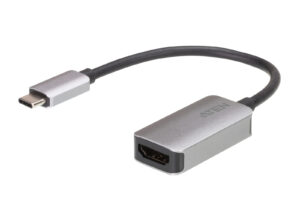
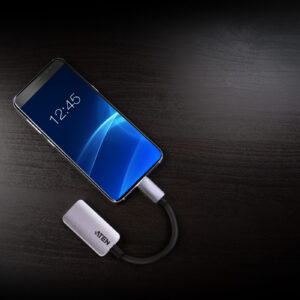
The UC3008A1 is a USB-C to HDMI 4K adapter that allows you to transfer the video of your USB-C equipped laptop, tablet or smartphones to a monitor, TV or projector. The UC3008A1 supports high video resolutions up to 4096 x 2160@60Hz so that you can conveniently scale your display output to a bigger monitor or do presentations from a projector. In addition, it’s does not require external drivers or additional power.
-


R340
With the ATEN USB-C to RS-232 Adapter, you’ll be able to connect legacy serial devices to modern computers that don’t have a COM or DB-9 serial port. Designed to be fully compliant with USB standards, this adapter delivers data transfer rates up to 921.6 Kb/s and works with Windows, Mac, and Linux systems. This bus-powered adapter serves as a connectivity solution for legacy devices, such as industrial automation systems, scientific instruments, point of sale systems, and other specialized industrial and consumer applications.
-


R295
The ATEN VC810 HDMI-to-VGA Converter is the perfect solution for connecting your HDMI source devices to VGA display devices. With its compact and lightweight design, this converter is easy to carry and use wherever you go. Enjoy high-quality video output with a maximum resolution of 1920 x 1200, ensuring crisp and clear visuals. The VC810 features plug-and-play functionality, eliminating the need for additional software or drivers.
-

R210
The VC925 is a DisplayPort to VGA adapter, allowing you to connect your device’s DisplayPort output to the VGA input of a TV or other display.
-

R325
The Mini DisplayPort to DVI Adapter allows you to connect a device with a Mini DisplayPort to a Display with a DVI connector. The adapter is perfect for Mac series products, including MacBook, MacBook Pro, MacBook Air, Mac mini and Mac Pro.
-

R240
Converts DisplayPort signals to DVI output
DisplayPort 1.2 a compliant
Supports VGA, SVGA, XGA, SXGA, UXGA and resolutions up to 1080p (HDTV)
No software or driver installation required
-


R725
Display a single HDMI source onto two displays with the VS4812 Essentials 2-Port True 4K HDMI Splitter from ATEN. This compact splitter supports up to UHD 4K60 video input and output from sources such as gaming systems, Blu-ray players, laptops, and set-top boxes for output to two HDMI displays.

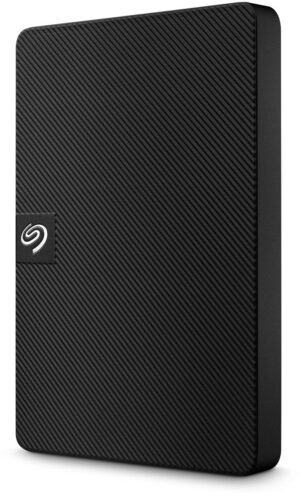 Seagate Expansion Portable 1TB 2.5" USB 5Gbps Black External Hard Drive
 Seagate SkyHawk AI 24TB 7200rpm SATA 6Gb/s 512MB Cache CMR Helium Internal Hard Drive
 Samsung 1TB T9 Portable Solid State Drive - Black
 VolkanoX Adder Series Bluetooth Speaker Black